Home banners: the right size, phone images and links
Add offer and collection banners to the top of your home page. Each theme has its own size — the panel shows it. You can add a separate phone image too.
Banners sit at the very top of your home page — the best place for a new collection, an Eid offer or free delivery news. Add several and they rotate automatically (a slider).
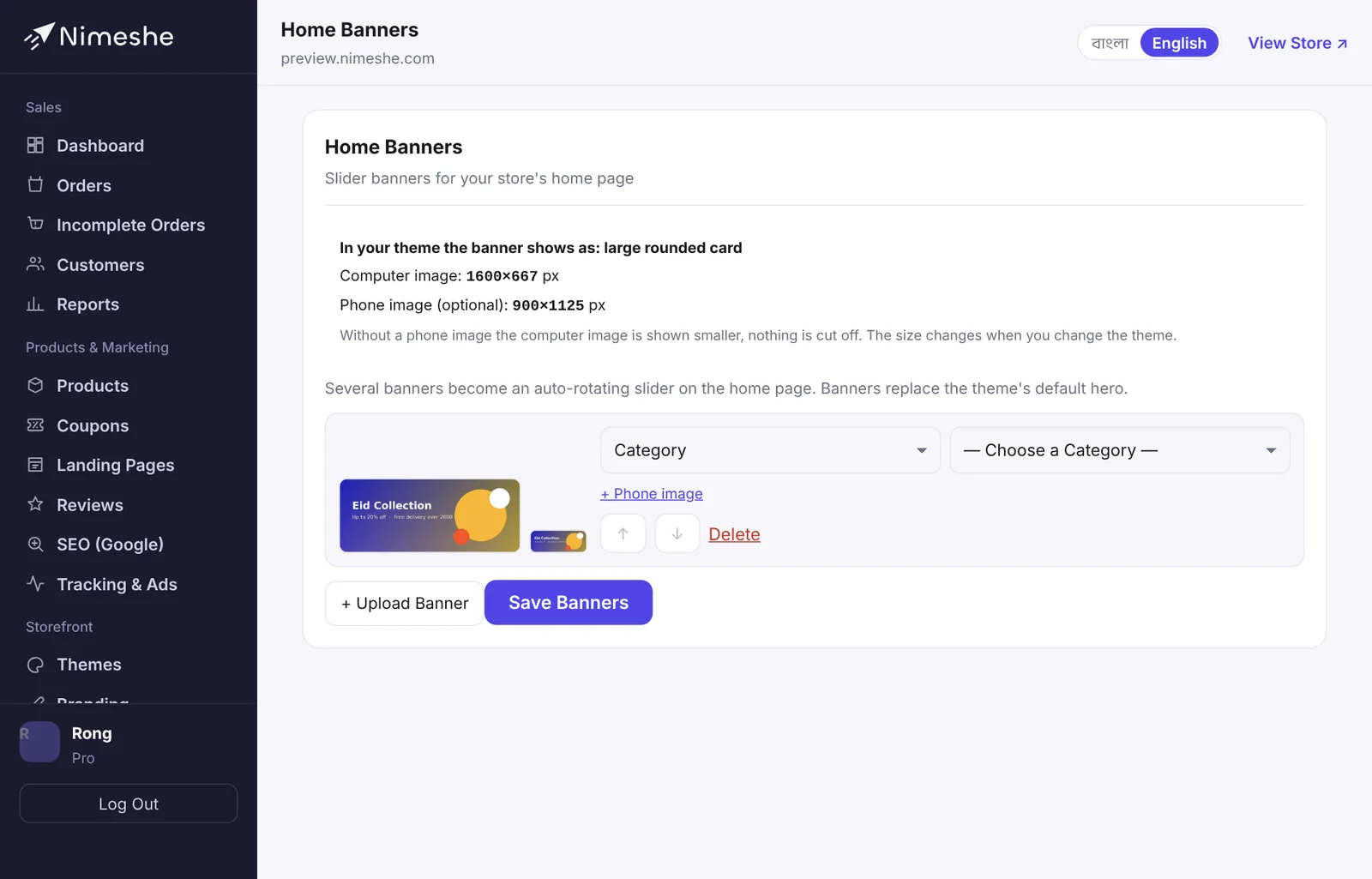
How to add a banner
- Open Home Banners from the menu.
- The top of the page says how banners show in your theme and the best size for the Computer image.
- Click + Upload Banner and choose your image.
- Have a separate phone design? Add it with + Phone image (optional).
- Choose where a click goes: No Links, a Product, a Category or a Custom Link.
- Click Save Banners, then check the How it shows on a computer and How it shows on a phone previews.
Size for each theme
| Theme | Computer image (px) | Phone image (px) |
|---|---|---|
| Clean Bazaar | 1500 × 500 | 900 × 675 |
| Aangan | 1680 × 700 | 900 × 900 |
| Kadam | 1600 × 727 | 900 × 1125 |
| Haat | 1600 × 615 | 900 × 1125 |
| Taaza | 1600 × 615 | 900 × 1125 |
| Glow | 1600 × 696 | 900 × 1125 |
| Volt | 1600 × 640 | 900 × 1125 |
| Chhap | 1920 × 600 | 900 × 900 |
| Zen | 1500 × 625 | 900 × 1125 |
| Utsob | 1920 × 768 | 900 × 506 |
| Nitto | 1600 × 667 | 900 × 1125 |
| Moja | 1600 × 667 | 900 × 1125 |
| Shishu | 1600 × 696 | 900 × 1125 |
| Rong | 1600 × 667 | 900 × 1125 |
The exact size isn't required, but keep the shape (width ÷ height) close.
Why add a phone image?
Without one, the computer image is shown smaller on phones — nothing is cut off, but text gets small. A taller image made for phones keeps the text big and clear. Most customers shop on phones, so it's worth it.
Tips for good banners
- Keep text near the middle of the image, not at the edges.
- One message per banner, short and clear: "Eid collection — 20% off".
- Use JPG or WEBP under 5 MB so the store loads fast.
- Two or three banners is usually enough.
FAQ
Do banners break if I change theme?
No, they stay. The new theme may use a different shape, so check the preview and upload a new size if needed.
How do I change the banner order?
Each banner has ↑ and ↓ buttons. Move it up or down and click Save Banners. The top one shows first.