How fraud check works: fewer fake orders and returns
Shows how many parcels a phone number accepted and returned before, and rates the risk. Ask risky customers for an OTP, an advance or a call before you ship.
On this page
With cash on delivery, the biggest losses are fake orders and refused parcels — you pay delivery both ways. Nimeshe's fraud check tells you which customers are risky before you ship.
How the risk is worked out
It looks at what happened to earlier orders from the same phone number:
- Nimeshe network: how many orders to this number were delivered, returned or canceled across all Nimeshe stores. Courier-confirmed results count most.
- Courier network: records from Steadfast, Pathao and Carrybee (from Basic, within a monthly limit).
- Your past orders: if you import a CSV from your courier panel, those count too (at half weight).
One or two returns don't make someone risky; the rate across many orders decides.
Risk levels
| Badge | Meaning | What to do |
|---|---|---|
| New Customer | No history yet | Ship as usual; call once for big orders |
| Safe | Accepts most orders | Ship with confidence |
| Caution | Some returns | Call to confirm |
| Risky | Many returns or cancellations | Take an advance or don't ship without a confirmation call |
Every new order gets this badge automatically. Click Fraud Check under an order to see the full report: total orders, delivered, returned, canceled and the reasons.
Checking any number
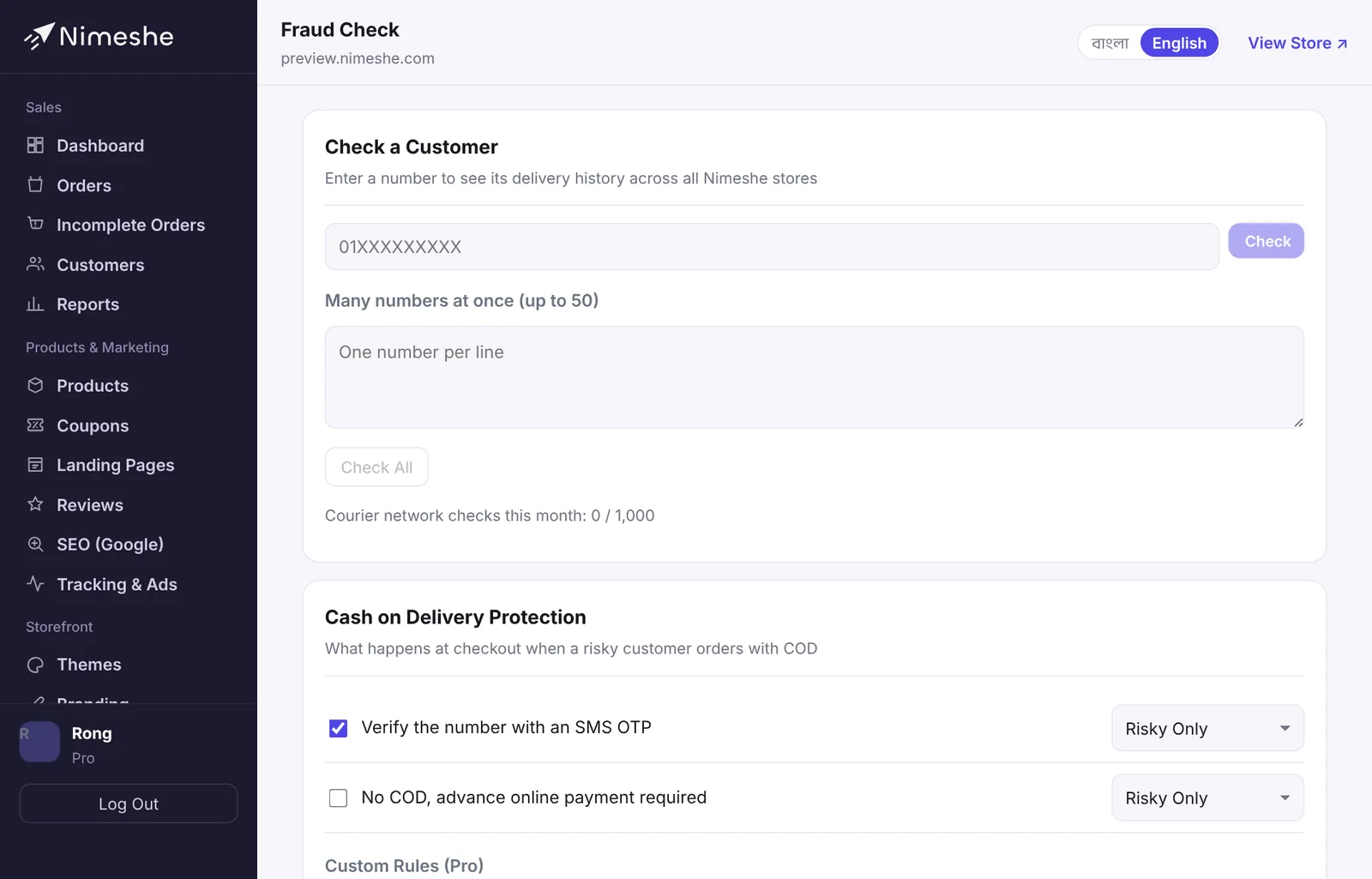
To check a number before taking an inbox order, go to the Fraud Check page, enter it under Check a Customer and click Check. On Pro, Many numbers at once checks up to 50 numbers, one per line.
Cash on delivery protection (automatic at checkout)
Under Cash on Delivery Protection on the Fraud Check page, choose what happens when a risky customer orders with COD:
- OTP Verification: the customer must confirm their number with an SMS code. Orders from fake numbers stop.
- Advance Online Payment: no COD; they must pay online to order (needs an online payment connected).
- Hold (Call to Confirm): the order is taken but flagged on hold — call to confirm before you ship.
Then choose whether this applies to Risky Only or to Caution and Risky customers. On Pro you can add Custom Rules, e.g. "if the order is ৳5000 or more, any customer needs an OTP".
Importing past orders
Put your history from before Nimeshe to work:
- Download your order list as a CSV from your courier panel (Steadfast, Pathao…).
- Under Import Past Orders on the Fraud Check page, choose the file and click Check File.
- Match the phone number and delivery status columns (only these two are needed).
- Review how many will be imported and click Import. Made a mistake? Undo it under Previous Imports.
What each plan includes
| Feature | Free | Basic | Standard | Pro |
|---|---|---|---|---|
| Risk badge on orders | ✓ | ✓ | ✓ | ✓ |
| Full report and number check | — | ✓ | ✓ | ✓ |
| Cash on delivery protection | — | ✓ | ✓ | ✓ |
| Courier network checks (per month) | — | 200 | 300 | 1,000 |
| Custom rules and 50-number bulk check | — | — | — | ✓ |
Privacy
Nobody can see another store's customer names, addresses or purchases. The fraud network stores phone numbers as one-way codes (hashes) and only shows counts of delivery outcomes.
FAQ
A good customer shows as risky.
The badge only sums up past records — the final decision is yours. If a call confirms the order, ship it as usual. Each delivery improves their record.
Can fraud check ever block a sale?
Only through the protection you turned on. If the fraud check itself has a problem (say the network is down), orders go through normally — it never blocks a sale on its own.